Building my own design-to-code agent

UI Forge — a governed design-system-to-code system
Role
Sole designer
and builder
What it is
A governed
design-to-code system
Built with
Codex, Claude Code
Status
Working prototype,
in active development

Building the reliability layer for AI design-to-code

UI Forge is a system I built for turning a design system into production code without silently changing it along the way. It treats Figma as a source of truth, turns its rules into implementation contracts, and refuses to generate a component until there is enough evidence to build it correctly. It is a personal project, still a working prototype, and the clearest proof of how I actually work with AI: with governance and traceability, so the tool cannot quietly invent the decisions a designer should make.
The problem

AI design-to-code tools are built for speed. They take a picture of an interface and produce something that looks close enough, fast. That is useful for a first draft, and it is the wrong tool for a real design system.

The trouble is what happens when the source is incomplete. A model asked to build a component from a partial design fills the gaps with something plausible. It hardcodes a color that was meant to be a token. It invents a spacing value. It guesses an interaction. None of this shows up in the output, because the result still looks fine. The design system quietly gains exceptions it never approved, and the distance between what was designed and what was built grows with every generation.

That gap is the thing I care about. A design system is only worth the effort if the code stays faithful to it. So I built the tool I wanted: one that implements an existing system without changing it behind your back.

How it works
Reading a Figma design system as structured source data

UI Forge sits between design and code as a controlled translation layer.

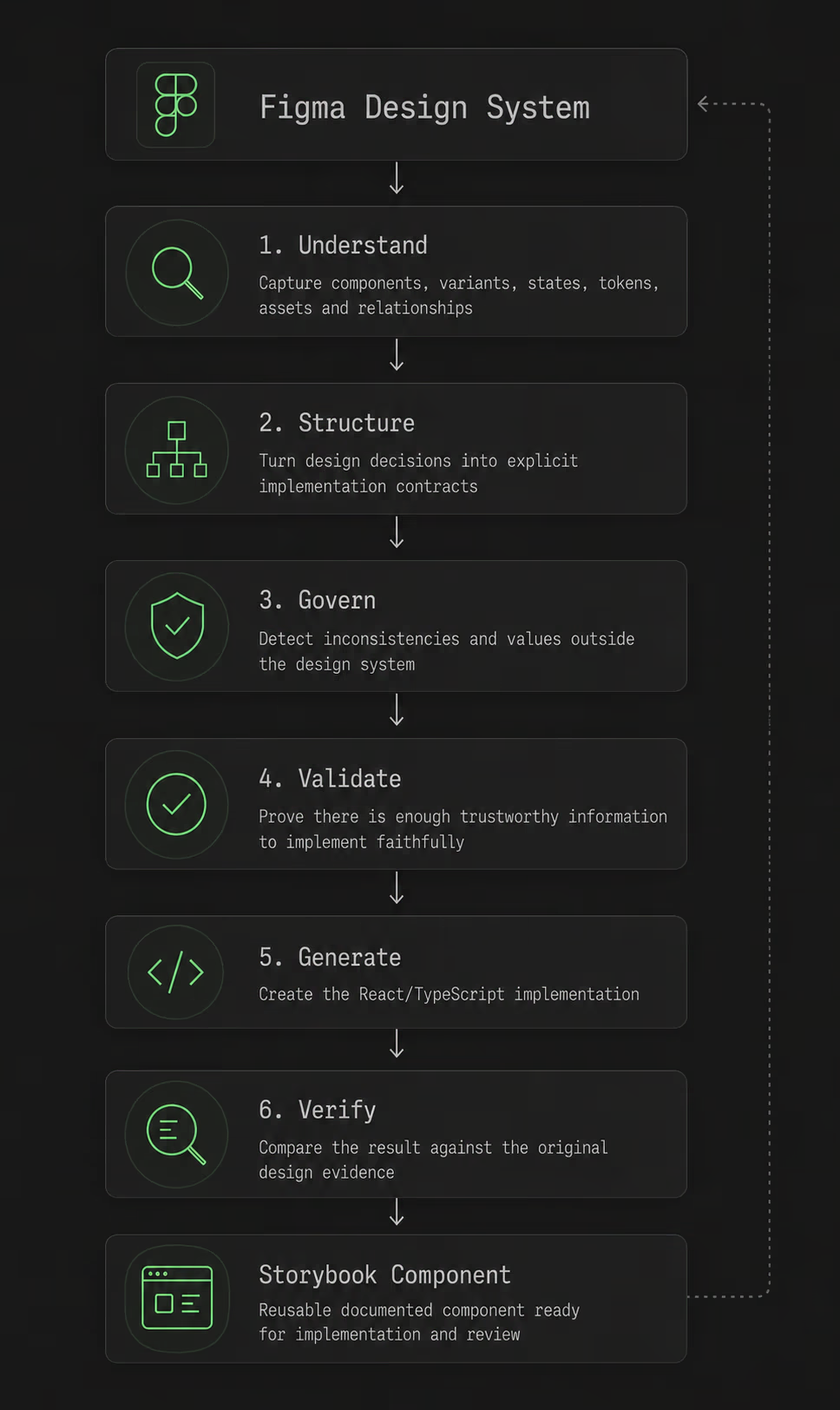
It reads a Figma design system as structured source data, not as a visual reference. It identifies the components, variants, states, tokens, assets, and the relationships between them. It then turns those into explicit implementation contracts: a definition of what should be built, and what evidence is required before generation can begin.

It also acts as a governance layer. When it meets a value that falls outside the existing system, it surfaces the discrepancy instead of hardcoding it. The value can be corrected to an existing token, or deliberately proposed as a new one that flows back into Figma.

Generation only moves forward once the required evidence is present and validated. Every generated component stays traceable to its Figma source, so the final implementation can be checked against the decisions that produced it.

What makes it different

Most design-to-code tools optimize for getting from an idea to a working interface as fast as possible. UI Forge optimizes for a harder problem: implementing an existing design system without silently changing it. It captures components, variants, tokens, assets, relationships, and behavioral requirements as explicit constraints. AI can assist with the implementation, but it is not free to invent missing decisions. When the source is incomplete or ambiguous, the system surfaces the gap instead of generating a plausible substitute.

That leads to four deliberate choices.

The goal was never to generate a UI that looks right. It was to produce an implementation that can explain why it is right.

Where it is, and where it is going

I would describe UI Forge today as a working prototype of the reliability layer that deterministic design-to-code needs. It is a personal project, not a public product, and I am still closing gaps, which is exactly why I am careful about how I talk about it.

What already works: reliable capture of a Figma design system, identification of reusable components, traceability back to the original design source, and handling of complex component families spread across multiple Figma structures. Right now I am strengthening the rules that decide when there is enough trustworthy evidence for a component to move into implementation.

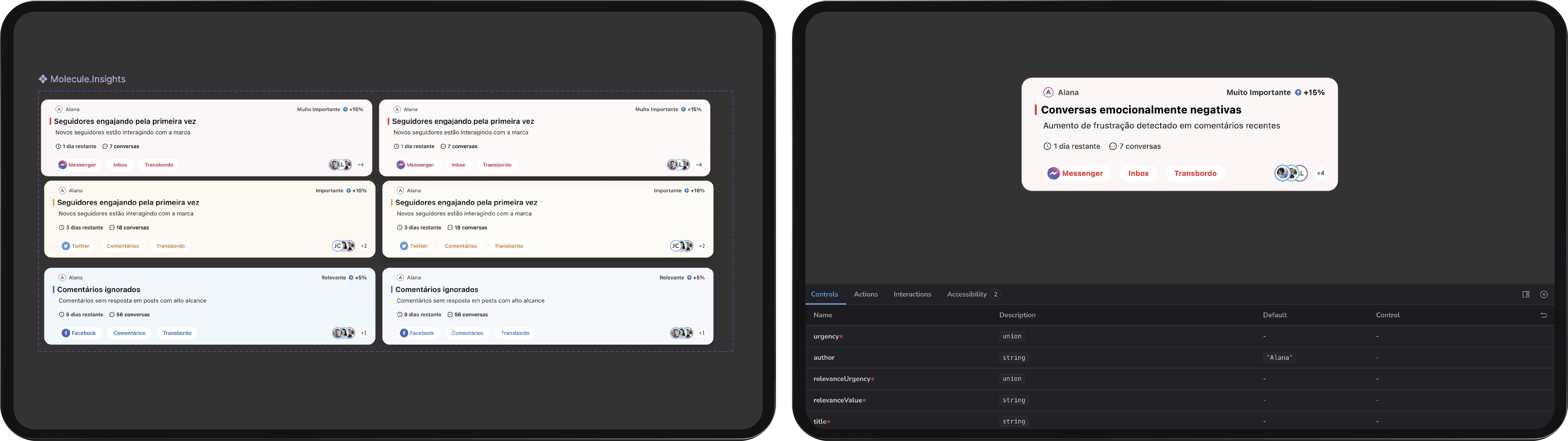
From there the roadmap moves downstream, in order: assets and tokens, then variants and states, then interaction and accessibility, then Storybook representation, and finally visual validation of the generated component against the original design.

I would rather show it than describe it. A short live walk-through is the best way to see how it works, and I am always happy to give one.

The UI Forge roadmap, from capture to visual validation
What it proves

Every design role I look at asks for fluency with AI. Most people answer that by listing the tools they use. I built one.

More than the tool, it shows how I think. I treat AI as something to constrain and hold to evidence, and I care about the line between what a machine can safely decide and what a designer has to. It is the engineering counterpart to my design-system work: that project made a system consistent, this one keeps a system honest all the way into the code.

It also reflects how I work day to day. I design AI-native, build my own tooling with code, and would rather ship a working thing than describe one.

What building it taught me

The counterintuitive lesson is that AI got more useful to me as I gave it less freedom. Reliability did not come from a smarter model or a cleverer prompt. It came from being strict about evidence: deciding what has to be known before anything is generated, and refusing to let the tool guess past that line. Good AI tooling, at least for something as opinionated as a design system, is mostly about being strict about what it is allowed to invent.

Next

Designing trust into an AI platform

LinkedIn